
Adding and editing an audio table of contents
Pour documenter la table des matières de votre publication audio, procédez de la façon suivante:
To document the table of contents of your audio publication:
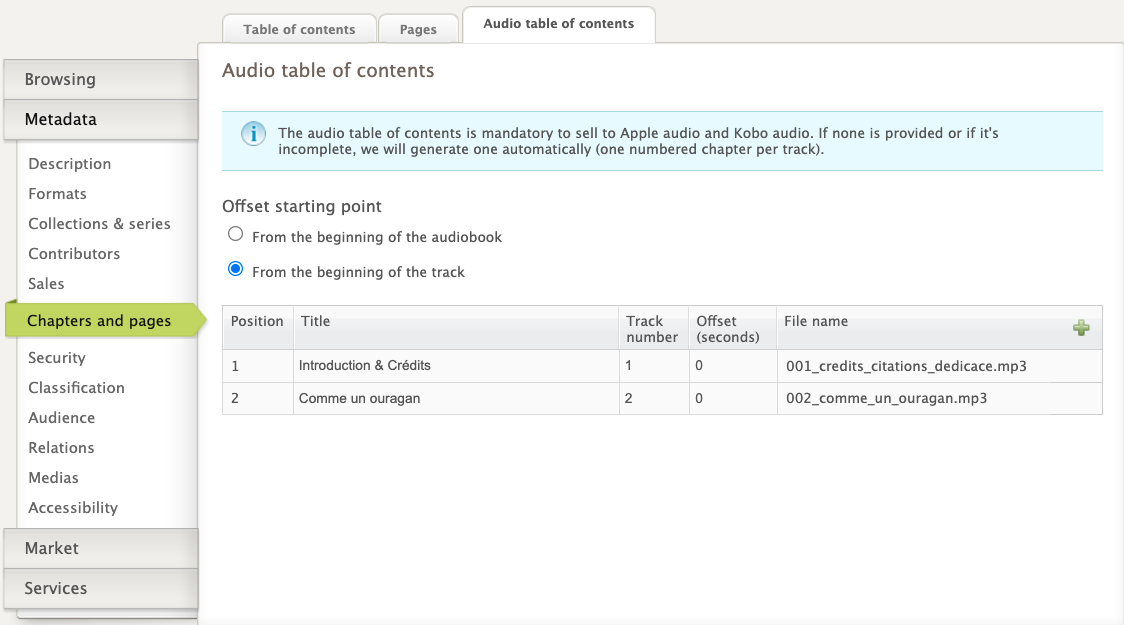
Go to the Chapters and Pages tab > Audio Table of Contents
Click on the " + "button
Enter the title of each section or chapter, and the corresponding track number
Also enter the chapter's timestamp, i.e. the location on the track, in seconds, at which the chapter beginsIn the case where each track contains a complete chapter, the timestamp is always 0. However, if a track contains two chapters, and the second chapter starts at the 120th second, the timestamp for that chapter will be 120.

In the case where each track contains a complete chapter, the timestamp is always 0. However, if a track contains two chapters, and the second chapter starts at the 120th second, the timestamp for that chapter will be 120.
You don't have to enter the file name of each track; just click on the validation icon and the platform will automatically retrieve it, according to the track number

It is therefore crucial to respect the naming convention for audio tracks. If your tracks are mislabeled, the platform may assign them to the wrong chapters.
If you do not provide a table of contents, the platform will automatically create one based on the tracks added for the format and their numerical order.